.NET and SQL database and have 2 different data type systems. For example, .NET has System.Int64 and System.String, while SQL database has bigint and nvarchar; .NET has sequences and objects, while SQL database has tables and rows;, etc. Object-relational mapping is a popular technology to map and convert between application data objects and database relational data. In LINQ to Entities, the queries are based on Object-relational mapping.
EF provides 3 options to build the mapping between C#/.NET and SQL database:
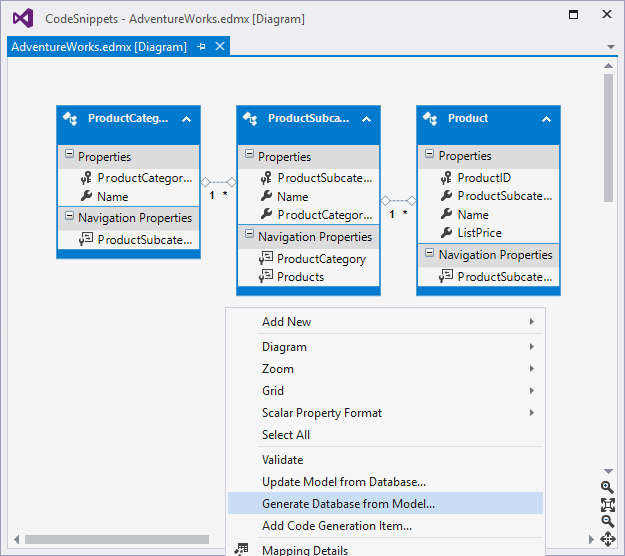
Model first: The entity data models (a .edmx diagram consists of entities, entity properties, entity associations, etc.) are first created in EF, typically by the ADO.NET Entity Data Model Designer tool in Visual Studio. Then, EF can use the models to generate database and the mapping .NET types.
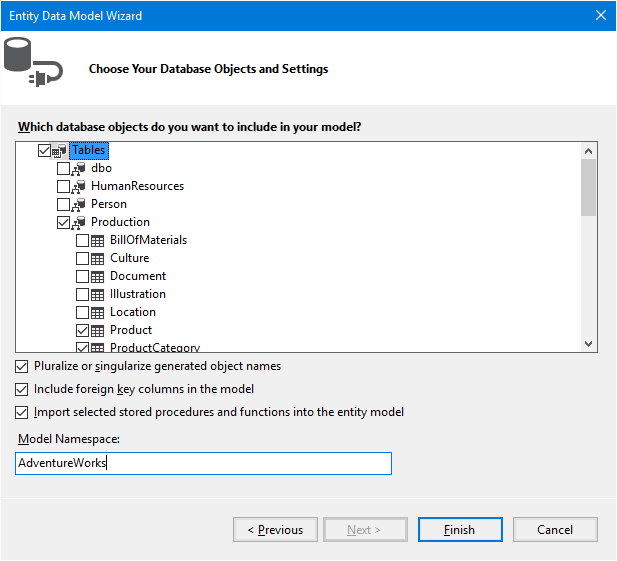
Database first: From an existing database, EF can generate the entity data models (.edmx diagram) and the mapping .NET types., typically by Entity Data Model Wizard too:
Code first: The mapping .NET types are coded to enabled LINQ to Entities queries and other operations. EF generates the entity data models at runtime, so there is no .edmx diagram at design time in the code base. If the database exits, the .NET types are just mapped to the existing database; if not, EF can generate the database. “Code first” is not an intuitive naming. It does not mean code is created before the database. It is just code-based modeling for existing database or new database.
Comparing to code generation from entity data models (.edmx), it is more intuitive and transparent to build code from scratch. Also, regarding EF Core does not support entity data models (.edmx) and only supports code first, this tutorial follows the code first approach.
DbContext implements IDisposable. Generally, a database instance should be constructed and disposed for each unit of work - a collection of data operations that should succeed or fail as a unit:
1
internalstaticvoidDispose()
2
{
3
using (AdventureWorksadventureWorks=newAdventureWorks())
4
{
5
// Unit of work.
6
}
7
}
In EF/Core, most of the object-relational mapping can be implemented declaratively, and the rest of the mapping can be implemented imperatively by overriding DbContext.OnModelCreating, which is called by EF/Core when initializing the entity models:
Here when database connection is not provided to the constructor, a new database connection is created with the previously defined connection string. Also, regarding the connection between application and SQL database may be interrupted (because of network, etc.), EF/Core support connection resiliency for SQL database. This is especially helpful for Azure SQL database deployed in the cloud instead of local network. In the above example, EF Core is specified to automatically retries up to 5 times with the retry interval of 30 seconds.
In EF, the database connection can be injected through constructor too:
At runtime, EF discovers and instantiates the above RetryConfiguration type with reflection, so that RetryConfiguration constructor is called. Here ExecutionStrategy.DisableExecutionStrategy can be used to turn on/off the above default retry logic: when ExecutionStrategy.DisableExecutionStrategy is true, a System.Data.Entity.Infrastructure.DefaultExecutionStrategy instance specifies EF do not retry; when it is false, a System.Data.Entity.SqlServer.SqlAzureExecutionStrategy instance specified EF to retry up to 5 times with the retry interval of 30 seconds.
Why not simply leave the retry enabled all the time? The reason is, EF connection resiliency does not directly work with custom transactions. So this switch is introduced to disable default retry logic for custom transactions, which is discussed in the transaction part.
There are tens of tables in the AdventureWorks database, but don’t panic, this tutorial only involves a few tables, and a few columns of these tables. In EF/Core, a table definition can be mapped to an entity type definition, where each column is mapped to a entity property. For example, the AdventureWorks database has a Production.ProductCategory table, which is defined as:
The [Table] attribute specifies the table name and schema. [Table] can be omitted when the table name is the same as the entity name, and the table is under the default dbo schema. In the table-entity mapping:
The ProductCategoryID column of int type is mapped to a System.Int32 property with the same name. The [Key] attribute indicates it is a primary key. EF/Core requires a table to have primary key to be mapped. [DatabaseGenerated] indicates it is an identity column, with value generated by database.
The Name column is of dbo.Name type. which is actually nvarchar(50), so it is mapped to Name property of type System.String. The [MaxLength] attribute indicates the max length of the string value is 50. [Required] indicates it should not be null or empty string or whitespace string.
The other columns rowguid and ModifiedDate are not mapped. They are not used in this tutorial to keep the code examples simple.
At runtime, each row of Production.ProductCategory table is mapped to a ProductCategory instance.
EF by default does not directly instantiate ProductCategory. It dynamically defines another proxy type derived from ProductCategory, with a name like System.Data.Entity.DynamicProxies.Product_F84B0F952ED22479EF48782695177D770E63BC4D8771C9DF78343B4D95926AE8. This proxy type is where EF injects more logic like lazy loading, so that at design time the mapping entity type can be clean and declarative.
The rows of the entire table can be mapped to objects in an IQueryable data source, exposed as a property of the database type. DbSet implements IQueryable, and is provided to represent a table data source:
So each row in HumanResources.Employee table refers to one row in Person.Person table (an employee must be a person). On the other hand, each row in Person.Person table can be referred by 0 or 1 row in HumanResources.Employee table (a person can be an employee, or not). This relationship can be represented by navigation property of entity type:
The [ForeignKey] attribute indicates Employee entity’s BusinessEntityID property is the foreign key for the relationship represented by navigation property. Here Person is called the primary entity, and Employee is called the dependent entity. Their navigation properties are called reference navigation properties, because each navigation property can refer to a single entity.
For EF, the navigation property needs to be virtual to enable proxy entity to implement lazy loading. This will be discussed in the lazy loading part. EF Core does not support lazy loading, so the virtual keyword does not make difference for EF Core.
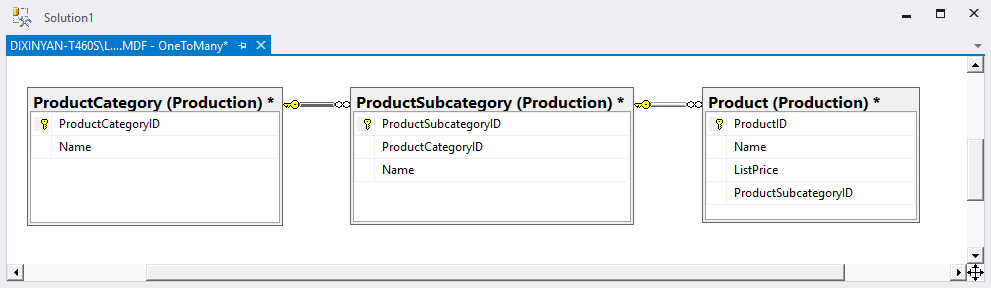
The Production.ProductCategory and Production.ProductSubcategory tables have a one-to-many relationship, so are Production.ProductSubcategory and Production.Product:
Each row in Production.ProductCategory table can refer to many rows in Production.ProductSubcategory table (category can have many subcategories), and each row in Production.ProductSubcategory table can refer to many rows in Production.Product table (ubcategory can have many products):
Notice Production.Product table’s ProductSubcategoryID column is nullable, so it is mapped to a System.Nullable property. Here [ForeignKey] attribute is omitted, because the dependent entities’ foreign keys are different from their primary keys, and each foreign key have the same name as its primary key, so they can be automatically discovered by EF/Core.
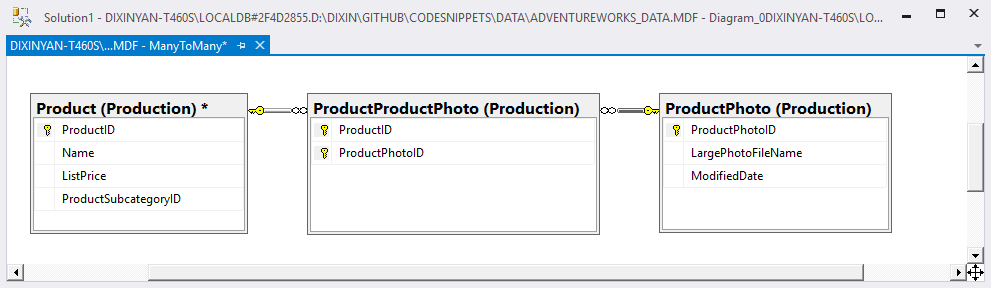
ProductPhoto.ModifiedDate has a [ConcurrencyCheck] attribute for concurrency conflict check, which is discussed in the concurrency part. Production.ProductProductPhoto table has a composite primary key. As a junction table, each row in the table has a unique combination of ProductID and ProductPhotoID. EF Core requires additional information for composite primary key, which can be provided as anonymous type in OnModelCreating:
1
publicpartialclassAdventureWorks
2
{
3
privatestaticvoidMapCompositePrimaryKey(ModelBuildermodelBuilder) // Called by OnModelCreating.
EF does not require above anonymous type to represent composite primary key, but it requires the ordering, which can be simply provided by the [Column] attribute.
EF Core also requires additional information for many-to-many relationship represented by 2 one-to-many relationships, which can be provided in OnModelCreating as well:
1
publicpartialclassAdventureWorks
2
{
3
privatestaticvoidMapManyToMany(ModelBuildermodelBuilder) // Called by OnModelCreating.
The above code in MapCompositePrimaryKey and MapManyToMany methods are not needed by EF.
EF also provides another option to directly map the many-to-many relationship with API calls. With the this approach, the above ProductProductPhoto entity and one-to-many navigation properties are not needed. Just define 2 collection navigation properties, and specified the mapping in OnModelCreating:
EF Core supports table per hierarchy (TPH) inheritance, which is also the default strategy of EF. With TPH, rows in 1 table is mapped to many entities in the inheritance hierarchy, so a discriminator column is needed to identify each specific row’s mapping entity. Take the following Production.TransactionHistory table as example:
CHECK (UPPER([TransactionType]) = N'P' OR UPPER([TransactionType]) = N'S' OR UPPER([TransactionType]) = N'W'),
14
15
[Quantity] int NOT NULL,
16
17
[ActualCost] money NOT NULL
18
19
/* Other columns. */);
20
GO
Its TransactionType column allows value “P”, “S”, or “W” to indicate each row representing a purchase transaction, sales transaction, or work transaction. So the mapping hierarchy can be:
A view can also be mapped as if it is a table, if the view has one or more columns which can be viewed as primary key. Take the Production.vEmployee view as example:
1
CREATE VIEW [HumanResources].[vEmployee]
2
AS
3
SELECT
4
e.[BusinessEntityID],
5
p.[FirstName],
6
p.[LastName],
7
e.[JobTitle]
8
-- Other columns.
9
FROM [HumanResources].[Employee] e
10
INNER JOIN [Person].[Person] p
11
ON p.[BusinessEntityID] = e.[BusinessEntityID]
12
/* Other tables. */;
13
GO
The BusinessEntityID is unique and can be viewed as primary key. So it can be mapped to the following entity: