As fore mentioned, LINQ to Entities queries are translated to database queries. To understand how EF/Core work with databases, it is important to uncover the actual underlying operations to the SQL database, which can be traced or logged in C# application side and in SQL database.
EF Core follows the ASP.NET Core logging infrastructure. To log EF Core operations, a logger (implementing Microsoft.Extensions.Logging.ILogger) and a logger provider (implementing Microsoft.Extensions.Logging.ILoggerProvider) can be defined. The following is a simple example to simply trace everything:
The logs uncovers that a SELECT statement is executed in database to query all categories. The logs also uncovers how exactly EF Core execute the operation – it compiles LINQ to Entities query and generates SQL, then opens a connection to SQL database, execute the generated SQL in database, and close the connection. This mechanism is discussed in the query translation part.
EF has different logging APIs. It provides 3 options: LINQ to Entities query’s ToString method, database façade’s Log property, and IDbInterceptor.
In EF, the easiest way is to call the query’s ToString method. In EF, LINQ to Entities query represented by IQueryable is actually implemented with System.Data.Entity.Infrastructure.DbQuery. The fore mentioned DbSet type representing table is derived from DbQuery too. For example:
1
internal staticpartial class Tracing
2
{
3
internal static void DbQueryToString()
4
{
5
using (AdventureWorks adventureWorks = new AdventureWorks())
// [Extent1].[ProductCategoryID] AS [ProductCategoryID],
11
// [Extent1].[Name] AS [Name]
12
//FROM [Production].[ProductCategory] AS [Extent1]
13
source.ForEach(); //Execute query.
14
}
15
}
16
}
The DbContext type has a Database property to expose a System.Data.Entity.Database instance, where a log function of type string –> void can be specified:
// [Extent1].[ProductCategoryID] AS [ProductCategoryID],
12
// [Extent1].[Name] AS [Name]
13
//FROM [Production].[ProductCategory] AS [Extent1]
14
//-- Executing at 5/21/2016 12:31:58 AM -07:00
15
//-- Completed in 11 ms with result: SqlDataReader4
16
// Closed connectionat5/21/201612:33:35 AM -07:00
17
}
EF also introduces interceptors for lower level logging control. Under System.Data.Entity.Infrastructure.Interception namespace, EF defines the IDbInterceptor interfaces, which is an empty interface inherited by IDbConfigurationInterceptor, IDbCommandInterceptor, IDbConnectionInterceptor, IDbTransactionInterceptor, and IDbCommandTreeInterceptor. For example, the following is the definition of IDbCommandInterceptor, whose methods are called before and after the execution of the translated SQL queries:
EF provides a number of built-in interceptor implementations. For example, the DatabaseLogFormatter type under the same namespace implements IDbCommandInterceptor, IDbConnectionInterceptor and IDbTransactionInterceptor. And it has a lot of virtual members to be overridden with custom logging logic. An interceptor has to be registered with DbInterception.Add:
1
internal static void Interceptor()
2
{
3
DatabaseLogFormatter interceptor = new DatabaseLogFormatter(writeAction: log=>Trace.WriteLine(log));
4
DbInterception.Add(interceptor);
5
using (AdventureWorks adventureWorks = new AdventureWorks())
SQL database provides variant mechanisms to collect the information of executed operations. Extended Events is such a feature available in all cloud and on-premise SQL database editions. For Windows, SQL Server Management Studio is a rich tools to setup and views the event tracing. And this can also be done from other platform. In any SQL tool (like mssql extension for Visual Studio Code, which works on Linux, Mac, and Windows), connect to the Azure SQL database (or SQL Server on-premise database), and execute the following SQL to create an Extended Events session called Queries:
1
CREATE EVENT SESSION [Queries] ON DATABASE -- ON SERVER for SQL Server on-premise database.
It traces the transactions, SQL executions, and errors, etc. To start the session and collect events, execute the following SQL:
1
ALTER EVENT SESSION [Queries] ON DATABASE -- ON SERVER for SQL Server on-premise database.
2
STATE = START;
3
GO
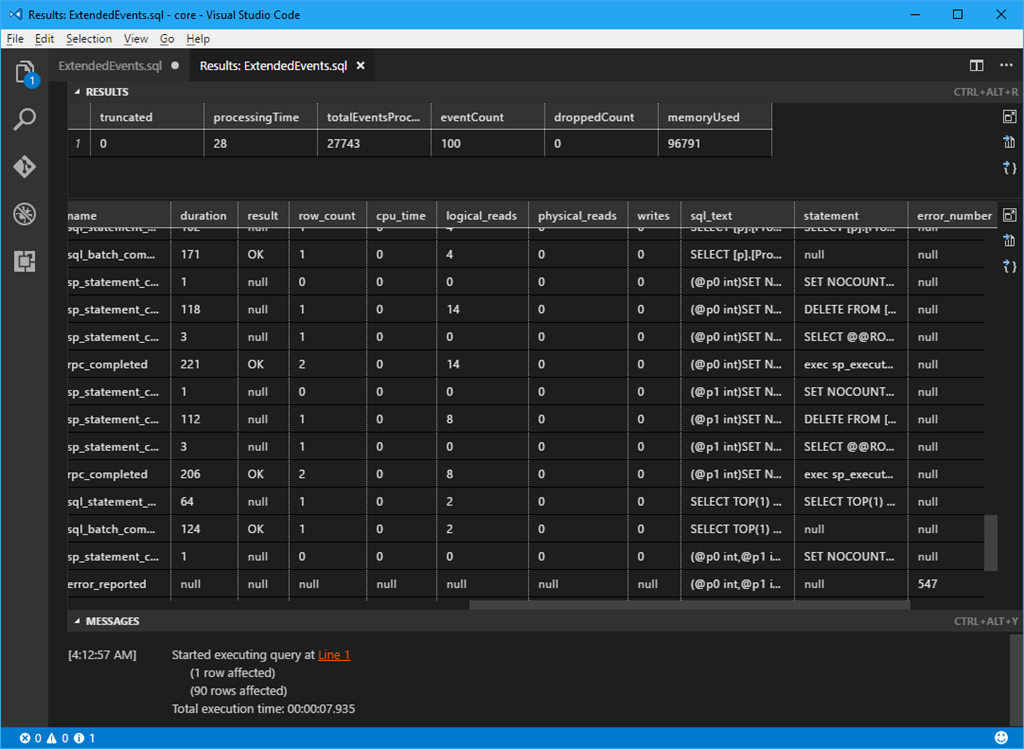
The collected events data is stored as XML, the following query formats the XML data to a statistics table, along with an event table which has the operations requested by .NET Core (or .NET Framework) application:
1
DECLARE @target_data XML=
2
(SELECTCONVERT(XML, [targets].[target_data])
3
FROMsys.dm_xe_database_session_targetsAS [targets] -- sys.dm_xe_session_targets for SQL Server on-premise database.
4
INNER JOINsys.dm_xe_database_sessionsAS [sessions] -- sys.dm_xe_sessions for SQL Server on-premise database.
5
ON [sessions].[address] = [targets].[event_session_address]
6
WHERE [sessions].[name] =N'Queries');
7
8
SELECT
9
@target_data.value('(RingBufferTarget/@truncated)[1]', 'bigint') AS [truncated],
10
@target_data.value('(RingBufferTarget/@processingTime)[1]', 'bigint') AS [processingTime],
11
@target_data.value('(RingBufferTarget/@totalEventsProcessed)[1]', 'bigint') AS [totalEventsProcessed],
12
@target_data.value('(RingBufferTarget/@eventCount)[1]', 'bigint') AS [eventCount],
13
@target_data.value('(RingBufferTarget/@droppedCount)[1]', 'bigint') AS [droppedCount],
14
@target_data.value('(RingBufferTarget/@memoryUsed)[1]', 'bigint') AS [memoryUsed];
15
16
SELECT
17
[event].value('@timestamp[1]', 'datetime') AS [timestamp],
18
[event].value('(action[@name="client_hostname"]/value)[1]', 'nvarchar(MAX)') AS [client_hostname],
19
[event].value('(action[@name="client_pid"]/value)[1]', 'bigint') AS [client_pid],
20
[event].value('(action[@name="client_connection_id"]/value)[1]', 'uniqueidentifier') AS [client_connection_id],
21
[event].value('(action[@name="session_id"]/value)[1]', 'bigint') AS [session_id],
22
[event].value('(action[@name="request_id"]/value)[1]', 'bigint') AS [request_id],
23
[event].value('(action[@name="database_name"]/value)[1]', 'nvarchar(MAX)') AS [database_name],
24
[event].value('@name[1]', 'nvarchar(MAX)') AS [name],
25
[event].value('(data[@name="duration"]/value)[1]', 'bigint') AS [duration],
26
[event].value('(data[@name="result"]/text)[1]', 'nvarchar(MAX)') AS [result],
27
[event].value('(data[@name="row_count"]/value)[1]', 'bigint') AS [row_count],
28
[event].value('(data[@name="cpu_time"]/value)[1]', 'bigint') as [cpu_time],
29
[event].value('(data[@name="logical_reads"]/value)[1]', 'bigint') as [logical_reads],
30
[event].value('(data[@name="physical_reads"]/value)[1]', 'bigint') as [physical_reads],
31
[event].value('(data[@name="writes"]/value)[1]', 'bigint') as [writes],
32
[event].value('(action[@name="sql_text"]/value)[1]', 'nvarchar(MAX)') AS [sql_text],
33
[event].value('(data[@name="statement"]/value)[1]', 'nvarchar(MAX)') AS [statement],
34
[event].value('(data[@name="error_number"]/value)[1]', 'bigint') AS [error_number],
35
[event].value('(data[@name="message"]/value)[1]', 'nvarchar(MAX)') AS [message]
36
FROM @target_data.nodes('//RingBufferTarget/event') AS [Rows]([event])
37
WHERE [event].value('(action[@name="client_app_name"]/value)[1]', 'nvarchar(MAX)') =N'Core .Net SqlClient Data Provider'-- N'.Net SqlClient Data Provider' for .NET Framework.
38
ORDER BY [timestamp];
The following is an example of how the traced database operations look like:
Entity Framework/Core and LINQ to Entities (3) Logging and Tracing Queries