

[LINQ via C# series]
[C# functional programming in-depth series]
Latest version: https://weblogs.asp.net/dixin/functional-csharp-asynchronous-function
Asynchronous function can improve the responsiveness and scalability of the application and service. C# 5.0 introduces async and await keywords to greatly simplify the async programming model.
Task, Task and asynchrony
In C#/.NET async programming model, System.Threading.Tasks.Task is provided to represent async operation returning void, and System.Threading.Tasks.Task
namespace System.Threading.Tasks{ public partial class Task : IAsyncResult { public Task(Action action); // () –> void
public void Start();
public void Wait();
public TaskStatus Status { get; } // Created, WaitingForActivation, WaitingToRun, Running, WaitingForChildrenToComplete, RanToCompletion, Canceled, Faulted.
public bool IsCanceled { get; }
public bool IsCompleted { get; }
public bool IsFaulted { get; }
public AggregateException Exception { get; }
Task ContinueWith(Action<Task> continuationAction);
Task<TResult> ContinueWith<TResult>(Func<Task, TResult> continuationFunction);
// Other members. }
public partial class Task<TResult> : Task { public Task(Func<TResult> function); // () –> TResult
public TResult Result { get; }
public Task ContinueWith(Action<Task<TResult>> continuationAction);
public Task<TNewResult> ContinueWith<TNewResult>(Func<Task<TResult>, TNewResult> continuationFunction);
// Other members. }}Task and Task
internal static partial class Functions{ internal static void CreateTask(string readPath, string writePath) { Thread.CurrentThread.ManagedThreadId.WriteLine(); // 10 Task<string> task = new Task<string>(() => { Thread.CurrentThread.ManagedThreadId.WriteLine(); // 8 return File.ReadAllText(readPath); }); task.Start(); Task continuationTask = task.ContinueWith(antecedentTask => { Thread.CurrentThread.ManagedThreadId.WriteLine(); // 9 object.ReferenceEquals(antecedentTask, task).WriteLine(); // True if (antecedentTask.IsFaulted) { antecedentTask.Exception.WriteLine(); } else { File.WriteAllText(writePath, antecedentTask.Result); } }); continuationTask.Wait(); }}As async operations, when tasks are started, the wrapped functions are by default scheduled to CLR/CoreCLR thread pool to execute, so that their thread ids are different from the caller thread id.
In .NET Framework, Task also implements System.Threading.IThreadPoolWorkItem and IDisposable interfaces. Its usage is the same as in .NET Core. Do not bother disposing tasks.
Task also provides Run methods to construct and automatically start tasks:
namespace System.Threading.Tasks{ public partial class Task : IAsyncResult { public static Task Run(Action action);
public static Task<TResult> Run<TResult>(Func<TResult> function); }}Now compare the following functions:
internal static void Write(string path, string contents) => File.WriteAllText(path, contents);
internal static string Read(string path) => File.ReadAllText(path);
internal static Task WriteAsync(string path, string contents) => Task.Run(() => File.WriteAllText(path, contents));
internal static Task<string> ReadAsync(string path) => Task.Run(() => File.ReadAllText(path));When Write is called, its execution blocks the current thread. When the writing operation is done synchronously, it returns without result, and then the caller thread can continue execution. Similarly, when Read is called, its execution blocks the current thread too. When the reading operation is done synchronously, it returns the result, so that the result is available to the caller and the caller can continue execution. When WriteAsync is called, it calls Task.Run to construct a Task instance with the writing operation, start the task, then immediately returns the task. Then the caller can continue without being blocked by the writing operation execution. By default, the writing operation is scheduled to thread pool, when it is done, the writing operation return no result, and the task’s Status is updated. Similarly, when ReadAsync is called, it also calls Task.Run to construct a Task
internal static void CallReadWrite(string path, string contents){ Write(path, contents); // Blocking. // Sync operation is completed with no result. string result = Read(path); // Blocking. // Sync operation is completed with result available.
Task writeTask = WriteAsync(path, contents); // Non blocking. // Async operation is scheduled to thread pool, and will be completed in the future with no result. Task<string> readTask = ReadAsync(path); // Non blocking. // Async operation is scheduled to thread pool, and will be completed in the future, then result will be available.}So Write returning void and Read returning a result are sync functions. WriteAsync returning Task and ReadAsync returning Task
Named async function
By default, named async function returns Task or Task
internal static void ReadWrite(string readPath, string writePath){ string contents = Read(readPath); Write(writePath, contents);}The same logic can be implemented by calling the async version of functions:
internal static async Task ReadWriteAsync(string readPath, string writePath){ string contents = await ReadAsync(readPath); await WriteAsync(writePath, contents);}Here await is used for each async function call, and the code structure remains the same as the sync workflow. When await keyword is used in function body, the async modifier is required for that function. Regarding the workflow returns no result, the async function returns Task (future void). This ReadWriteAsync function calls async functions, itself is also async function, since it has the async modifier and return Task. When ReadWriteAsync is called, it works the same way as ReadAsync and WriteAsync. it does not block its caller, and immediately returns a task to represent the scheduled read and write workflow.
So the await keyword can be viewed as virtually waiting for the task’s underlying async operation to finish. If the task fails, exception is thrown. If the task is completed successfully, the continuation right after the await expression is called back. If the task has a result, await can extract the result. Therefore,, the async workflow keeps the same looking of sync workflow. There is no ContinueWith call needed to build the continuation. The following example is a more complex database query workflow of sync function calls, and a int value is returned as the query result:
internal static int Query(DbConnection connection, StreamWriter logWriter){ try { connection.Open(); // Return void. using (DbCommand command = connection.CreateCommand()) { command.CommandText = "SELECT 1;"; using (DbDataReader reader = command.ExecuteReader()) // Return DbDataReader. { if (reader.Read()) // Return bool. { return (int)reader[0]; } throw new InvalidOperationException("Failed to call sync functions."); } } } catch (SqlException exception) { logWriter.WriteLine(exception.ToString()); // Return void. throw new InvalidOperationException("Failed to call sync functions.", exception); }}Here the DbConnection.Open, DbCommand.ExecuteReader, DbDataReader.Read, StreamWriter.WriteLine methods have async version provided as DbConnection.OpenAsync, DbCommand.ExecuteReaderAsync, DbDataReader.ReadAsync, StreamWriter.WriteLineAsync. They either return Task, or Task
internal static async Task<int> QueryAsync(DbConnection connection, StreamWriter logWriter){ try { await connection.OpenAsync(); // Return Task. using (DbCommand command = connection.CreateCommand()) { command.CommandText = "SELECT 1;"; using (DbDataReader reader = await command.ExecuteReaderAsync()) // Return Task<DbDataReader>. { if (await reader.ReadAsync()) // Return Task<bool>. { return (int)reader[0]; } throw new InvalidOperationException("Failed to call async functions."); } } } catch (SqlException exception) { await logWriter.WriteLineAsync(exception.ToString()); // Return Task. throw new InvalidOperationException("Failed to call async functions.", exception); }}Again, the async workflow persists the same code structure as the sync workflow, the try-catch, using, if block look the same. Without this syntax, it is a lot more complex to call ContinueWith and manually build above workflow. Regarding the async function returns a int result, its return type is Task
The above Write and Read functions calls File.WriteAllText and File.ReadAllText to execute sync I/O operation, which are internally implemented by calling StreamWriter.Write and StreamReader.ReadToEnd. Now with the async and await keywords, WriteAsync and ReadAsync can be implemented as real async I/O (as long as the underlying operating system supports async I/O) by calling StreamWriter.WriteAsync and StreamReader.ReadToEndAsync:
internal static async Task WriteAsync(string path, string contents){ // File.WriteAllText: // using (StreamWriter writer = new StreamWriter(new FileStream( // path: path, mode: FileMode.Create, access: FileAccess.Write, // share: FileShare.Read, bufferSize: 4096, useAsync: false))) // { // writer.Write(contents); // } using (StreamWriter writer = new StreamWriter(new FileStream( path: path, mode: FileMode.Create, access: FileAccess.Write, share: FileShare.Read, bufferSize: 4096, useAsync: true))) { await writer.WriteAsync(contents); }}
internal static async Task<string> ReadAsync(string path){ // File.ReadAllText: // using (StreamReader reader = new StreamReader(new FileStream( // path: path, mode: FileMode.Open, access: FileAccess.Read, // share: FileShare.Read, bufferSize: 4096, useAsync: false))) // { // return reader.ReadToEnd(); // } using (StreamReader reader = new StreamReader(new FileStream( path: path, mode: FileMode.Open, access: FileAccess.Read, share: FileShare.Read, bufferSize: 4096, useAsync: true))) { return await reader.ReadToEndAsync(); }}There is one special scenario where async function has to return void instead of Task – async event handler. For example, ObservableCollection
namespace System.Collections.ObjectModel{ public class ObservableCollection<T> : Collection<T>, INotifyCollectionChanged, INotifyPropertyChanged { public event NotifyCollectionChangedEventHandler CollectionChanged;
// Other members. }}
namespace System.Collections.Specialized{ public delegate void NotifyCollectionChangedEventHandler(object sender, NotifyCollectionChangedEventArgs e);}This event requires its handler to be a function of type (object, NotifyCollectionChangedEventArgs) –> void. So when defining an async function as the above event’s handler, that async function has to return void instead of Task:
internal static partial class Functions{ private static StringBuilder logs = new StringBuilder();
private static StringWriter logWriter = new StringWriter(logs);
private static async void CollectionChangedAsync(object sender, NotifyCollectionChangedEventArgs e) => await logWriter.WriteLineAsync(e.Action.ToString());
internal static void EventHandler() { ObservableCollection<int> collection = new ObservableCollection<int>(); collection.CollectionChanged += CollectionChangedAsync; collection.Add(1); // Fires CollectionChanged event. }}Besides task returned by the async functions, the await keyword works with any Task and Task
internal static async Task AwaitTasks(string path){ // string contents = await ReadAsync(path); Task<string> task1 = ReadAsync(path); string contents = await task1;
// await WriteAsync(path, contents); Task task2 = WriteAsync(path, contents); await task2;
// await Task.Run(() => { }); Task task3 = Task.Run(() => { }); await task3;
// int result = await Task.Run(() => 0); Task<int> task4 = Task.Run(() => 0); int result = await task4;
// await Task.Delay(TimeSpan.FromSeconds(10)); Task task5 = Task.Delay(TimeSpan.FromSeconds(10)); await task5;
// result = await Task.FromResult(result); Task<int> task6 = Task.FromResult(result); result = await task6;}If a task is never started, it never finishes running. The code after its await expression is never called back:
internal static async Task HotColdTasks(string path){ Task hotTask = new Task(() => { }); hotTask.Start(); await hotTask; hotTask.Status.WriteLine();
Task coldTask = new Task(() => { }); await coldTask; coldTask.Status.WriteLine(); // Never executes.}Task not started yet is called cold task, and task already started is called hot task. As a convention, any function returning task should always return a hot task. All .NET APIs follow this convention.
Awaitable-awaiter pattern
C# compiles the await expression with the awaitable-awaiter pattern. Besides Task and Task
public interface IAwaitable{ IAwaiter GetAwaiter();}
public interface IAwaiter : INotifyCompletion{ bool IsCompleted { get; }
void GetResult(); // No result.}And the following IAwaitable
public interface IAwaitable<TResult>{ IAwaiter<TResult> GetAwaiter();}
public interface IAwaiter<TResult> : INotifyCompletion{ bool IsCompleted { get; }
TResult GetResult(); // TResult result.}And INotifyCompletion interface has a single OnCompleted method to chain a continuation:
namespace System.Runtime.CompilerServices{ public interface INotifyCompletion { void OnCompleted(Action continuation); }}Here is how Task and Task
namespace System.Threading.Tasks{ public partial class Task : IAsyncResult { public TaskAwaiter GetAwaiter(); }
public partial class Task<TResult> : Task { public TaskAwaiter<TResult> GetAwaiter(); }}
namespace System.Runtime.CompilerServices{ public struct TaskAwaiter : ICriticalNotifyCompletion, INotifyCompletion { public bool IsCompleted { get; }
public void GetResult(); // No result.
public void OnCompleted(Action continuation);
// Other members. }
public struct TaskAwaiter<TResult> : ICriticalNotifyCompletion, INotifyCompletion { public bool IsCompleted { get; }
public TResult GetResult(); // TResult result.
public void OnCompleted(Action continuation);
// Other members. }}Any other type can be used with the await keyword, as long as the awaitable-awaiter pattern is implemented. Take Action as example, a GetAwaiter method can be easily implemented as an extension method, by reusing above TaskAwaiter:
public static partial class ActionExtensions{ public static TaskAwaiter GetAwaiter(this Action action) => Task.Run(action).GetAwaiter();}Similarly, this pattern can be implemented for Func
public static partial class FuncExtensions{ public static TaskAwaiter<TResult> GetAwaiter<TResult>(this Func<TResult> function) => Task.Run(function).GetAwaiter();}Now the await keyword can be used with a function directly:
internal static async Task AwaitFunctions(string readPath, string writePath){ Func<string> read = () => File.ReadAllText(readPath); string contents = await read;
Action write = () => File.WriteAllText(writePath, contents); await write;}Async state machine
As fore mentioned, with async and await keywords, an async function is non blocking. At compile time, the workflow of an async function is compiled to an async state machine. At runtime, when this async function is called, it just starts that async state machine generated by compiler, and immediately returns a task representing the workflow in the async state machine. To demonstrate this, define the following async methods:
internal static async Task<T> Async<T>(T value){ T value1 = Start(value); T result1 = await Async1(value1); T value2 = Continuation1(result1); T result2 = await Async2(value2); T value3 = Continuation2(result2); T result3 = await Async3(value3); T result = Continuation3(result3); return result;}
internal static T Start<T>(T value) => value;
internal static Task<T> Async1<T>(T value) => Task.Run(() => value);
internal static T Continuation1<T>(T value) => value;
internal static Task<T> Async2<T>(T value) => Task.FromResult(value);
internal static T Continuation2<T>(T value) => value;
internal static Task<T> Async3<T>(T value) => Task.Run(() => value);
internal static T Continuation3<T>(T value) => value;After compilation, the async modifier is gone. The async function becomes a normal function to start a async state machine:
[AsyncStateMachine(typeof(AsyncStateMachine<>))]internal static Task<T> CompiledAsync<T>(T value){ AsyncStateMachine<T> asyncStateMachine = new AsyncStateMachine<T>() { Value = value, Builder = AsyncTaskMethodBuilder<T>.Create(), State = -1 // -1 means start. }; asyncStateMachine.Builder.Start(ref asyncStateMachine); return asyncStateMachine.Builder.Task;}And the generated async state machine is a structure in release build, and a class in debug build:
[CompilerGenerated][StructLayout(LayoutKind.Auto)]private struct AsyncStateMachine<TResult> : IAsyncStateMachine{ public int State;
public AsyncTaskMethodBuilder<TResult> Builder;
public TResult Value;
private TaskAwaiter<TResult> awaiter;
void IAsyncStateMachine.MoveNext() { TResult result; try { switch (this.State) { case -1: // Start code from the beginning to the 1st await. // Workflow begins. TResult value1 = Start(this.Value); this.awaiter = Async1(value1).GetAwaiter(); if (this.awaiter.IsCompleted) { // If the task returned by Async1 is already completed, immediately execute the continuation. goto case 0; } else { this.State = 0; // If the task returned by Async1 is not completed, specify the continuation as its callback. this.Builder.AwaitUnsafeOnCompleted(ref this.awaiter, ref this); // Later when the task returned by Async1 is completed, it calls back MoveNext, where State is 0. return; } case 0: // Continuation code from after the 1st await to the 2nd await. // The task returned by Async1 is completed. The result is available immediately through GetResult. TResult result1 = this.awaiter.GetResult(); TResult value2 = Continuation1(result1); this.awaiter = Async2(value2).GetAwaiter(); if (this.awaiter.IsCompleted) { // If the task returned by Async2 is already completed, immediately execute the continuation. goto case 1; } else { this.State = 1; // If the task returned by Async2 is not completed, specify the continuation as its callback. this.Builder.AwaitUnsafeOnCompleted(ref this.awaiter, ref this); // Later when the task returned by Async2 is completed, it calls back MoveNext, where State is 1. return; } case 1: // Continuation code from after the 2nd await to the 3rd await. // The task returned by Async2 is completed. The result is available immediately through GetResult. TResult result2 = this.awaiter.GetResult(); TResult value3 = Continuation2(result2); this.awaiter = Async3(value3).GetAwaiter(); if (this.awaiter.IsCompleted) { // If the task returned by Async3 is already completed, immediately execute the continuation. goto case 2; } else { this.State = 2; // If the task returned by Async3 is not completed, specify the continuation as its callback. this.Builder.AwaitUnsafeOnCompleted(ref this.awaiter, ref this); // Later when the task returned by Async3 is completed, it calls back MoveNext, where State is 1. return; } case 2: // Continuation code from after the 3rd await to the end. // The task returned by Async3 is completed. The result is available immediately through GetResult. TResult result3 = this.awaiter.GetResult(); result = Continuation3(result3); this.State = -2; // -2 means end. this.Builder.SetResult(result); // Workflow ends. return; } } catch (Exception exception) { this.State = -2; // -2 means end. this.Builder.SetException(exception); } }
[DebuggerHidden] void IAsyncStateMachine.SetStateMachine(IAsyncStateMachine asyncStateMachine) => this.Builder.SetStateMachine(asyncStateMachine);}The generated async state machine is a finite state machine:
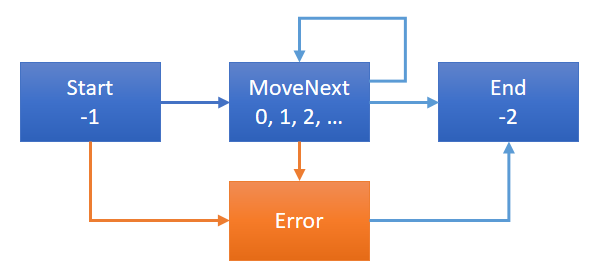
The workflow is compiled into its MoveNext method, and the workflow is split to 4 blocks by the 3 await keywords. The parameter of the workflow is compiled as a field of the state machine, so that is can be accessed by the workflow inside MoveNext. When the state machine is initialized, its initial state is –1, which means start. Once the state machine is started, MoveNext is called, and the case –1 block is executed, which has the code from the beginning of the workflow to the first await expression, which is compiled to a GetAwaiter call. If the awaiter is already completed, then the continuation should immediate be executed, so the next case 0 block is executed; If the awaiter is not completed, the continuation (MoveNext call with next state 0) is specified as the awaiter’s callback when it is completed in the future. In either case, when code in case 0 block is executed, the previous awaiter is already completed, and its result is immediately available through its GetResult method. The execution goes on in the same pattern, until the last block of case 2 is executed.
Runtime context capture
For each await expression, if the awaited task is not completed yet, the continuation is scheduled as callback when it is completed. As a result, the continuation can be executed by a thread different from initial caller thread. By default, the initial thread’s runtime context information are captured, and are reused by the to execute the continuation. To demonstrate this, the above awaitable-awaiter pattern for Action can be re-implemented with with custom awaiter:
public static partial class ActionExtensions{ public static IAwaiter GetAwaiter(this Action action) => new ActionAwaiter(Task.Run(action));}
public class ActionAwaiter : IAwaiter{ private readonly (SynchronizationContext, TaskScheduler, ExecutionContext) runtimeContext = RuntimeContext.Capture();
private readonly Task task;
public ActionAwaiter(Task task) => this.task = task;
public bool IsCompleted => this.task.IsCompleted;
public void GetResult() => this.task.Wait();
public void OnCompleted(Action continuation) => this.task.ContinueWith(task => this.runtimeContext.Execute(continuation));}When the awaiter is constructed, it captures the runtime context information, including System.Threading.SynchronizationContext, System.Threading.Tasks.TaskScheduler, and System.Threading.ExecutionContext of current thread. Then in OnCompleted, when the continuation is called back, it is executed with the previously captured runtime context information. The custom awaiter can be implemented for Func
public static partial class FuncExtensions{ public static IAwaiter<TResult> GetAwaiter<TResult>(this Func<TResult> function) => new FuncAwaiter<TResult>(Task.Run(function));}
public class FuncAwaiter<TResult> : IAwaiter<TResult>{ private readonly (SynchronizationContext, TaskScheduler, ExecutionContext) runtimeContext = RuntimeContext.Capture();
private readonly Task<TResult> task;
public FuncAwaiter(Task<TResult> task) => this.task = task;
public bool IsCompleted => this.task.IsCompleted;
public TResult GetResult() => this.task.Result;
public void OnCompleted(Action continuation) => this.task.ContinueWith(task => this.runtimeContext.Execute(continuation));}The following is a basic implementation of runtime context capture and resume:
public static class RuntimeContext{ public static (SynchronizationContext, TaskScheduler, ExecutionContext) Capture() => (SynchronizationContext.Current, TaskScheduler.Current, ExecutionContext.Capture());
public static void Execute( this (SynchronizationContext, TaskScheduler, ExecutionContext) runtimeContext, Action continuation) { var (synchronizationContext, taskScheduler, executionContext) = runtimeContext; if (synchronizationContext != null && synchronizationContext.GetType() != typeof(SynchronizationContext)) { if (synchronizationContext == SynchronizationContext.Current) { executionContext.Run(continuation); } else { executionContext.Run(() => synchronizationContext.Post( d: state => continuation(), state: null)); } return; } if (taskScheduler != null && taskScheduler != TaskScheduler.Default) { Task continuationTask = new Task(continuation); continuationTask.Start(taskScheduler); return; } executionContext.Run(continuation); }
public static void Run(this ExecutionContext executionContext, Action continuation) { if (executionContext != null) { ExecutionContext.Run( executionContext: executionContext, callback: executionContextState => continuation(), state: null); } else { continuation(); } }}When the continuation is executed, first the previously captured SynchronizationContext is checked. If a specialized SynchronizationContext is captured and it is different from current SynchronizationContext, then the continuation is executed with the captured SynchronizationContext and ExecutionContext. When there is no specialized SynchronizationContext captured, then the TaskScheduler is checked. If a specialized TaskScheduler is captured, it is used to schedule the continuation as a task. For all the other cases, the continuation is executed with the captured ExecutionContext.
Task and Task
namespace System.Threading.Tasks{ public partial class Task : IAsyncResult { public ConfiguredTaskAwaitable ConfigureAwait(bool continueOnCapturedContext); }
public partial class Task<TResult> : Task { public ConfiguredTaskAwaitable<TResult> ConfigureAwait(bool continueOnCapturedContext); }}To demonstrate the runtime context capture, define a custom task scheduler, which simply start a background thread to execute each task:
public class BackgroundThreadTaskScheduler : TaskScheduler{ protected override IEnumerable<Task> GetScheduledTasks() => throw new NotImplementedException();
protected override void QueueTask(Task task) => new Thread(() => this.TryExecuteTask(task)) { IsBackground = true }.Start();
protected override bool TryExecuteTaskInline(Task task, bool taskWasPreviouslyQueued) => this.TryExecuteTask(task);}The following async function has 2 await expressions, where ConfigureAwait is called with different bool values:
internal static async Task ConfigureRuntimeContextCapture(string readPath, string writePath){ TaskScheduler taskScheduler1 = TaskScheduler.Current; string contents = await ReadAsync(readPath).ConfigureAwait(continueOnCapturedContext: true); // Equivalent to: await ReadAsync(readPath);
// Continuation is executed with captured runtime context. TaskScheduler taskScheduler2 = TaskScheduler.Current; object.ReferenceEquals(taskScheduler1, taskScheduler2).WriteLine(); // True await WriteAsync(writePath, contents).ConfigureAwait(continueOnCapturedContext: false);
// Continuation is executed without captured runtime context. TaskScheduler taskScheduler3 = TaskScheduler.Current; object.ReferenceEquals(taskScheduler1, taskScheduler3).WriteLine(); // False}To demonstrate the task scheduler capture, call the above async function by specifying the custom task scheduler:
internal static async Task CallConfigureContextCapture(string readPath, string writePath){ Task<Task> task = new Task<Task>(() => ConfigureRuntimeContextCapture(readPath, writePath)); task.Start(new BackgroundThreadTaskScheduler()); await task.Unwrap(); // Equivalent to: await await task;}Here since async function ConfigureRuntimeContextCapture returns Task, so the task constructed with async function is of type Task
namespace System.Threading.Tasks{ public static class TaskExtensions { public static Task Unwrap(this Task<Task> task);
public static Task<TResult> Unwrap<TResult>(this Task<Task<TResult>> task); }}When async function ConfigureRuntimeContextCapture is executed, its initial task scheduler is the specified custom task scheduler. In the first await expression, ConfigureAwait is called with true, so that the runtime context information is captured and the continuation is executed with the captured runtime context information. This is the default behavior, so calling ConfigureAwait with true is equal to not calling ConfigureAwait at all. As a result, the first continuation is executed with the same custom task scheduler. In the second await expression, ConfigureAwait is called with false, so the runtime context information is not captured. As a result, the second continuation is executed with the default task scheduler (System.Threading.Tasks.ThreadPoolTaskScheduler).
The runtime context capture can be also demonstrated by SynchronizationContext. SynchronizationContext has different implementations in different application models, for example:
- ASP.NET: System.Web.AspNetSynchronizationContext
- WPF: System.Windows.Threading.DispatcherSynchronizationContext
- WinForms: System.Windows.Forms.WindowsFormsSynchronizationContext
- WinRT and Windows Universal: System.Threading.WinRTSynchronizationContext
Take Windows Universal application as example. In Visual Studio, create a Windows Universal application, add a button to its UI:
<Button x:Name="Button" Content="Button" HorizontalAlignment="Center" VerticalAlignment="Center" Click="ButtonClick" />In the code behind, implement the Click event handler as a async function:
private async void ButtonClick(object sender, RoutedEventArgs e){ SynchronizationContext synchronizationContext1 = SynchronizationContext.Current; ExecutionContext executionContext1 = ExecutionContext.Capture(); await Task.Delay(TimeSpan.FromSeconds(1)).ConfigureAwait(continueOnCapturedContext: true); // Equivalent to: await Task.Delay(TimeSpan.FromSeconds(1));
// Continuation is executed with captured runtime context. SynchronizationContext synchronizationContext2 = SynchronizationContext.Current; Debug.WriteLine(synchronizationContext1 == synchronizationContext2); // True this.Button.Background = new SolidColorBrush(Colors.Blue); // UI update works. await Task.Delay(TimeSpan.FromSeconds(1)).ConfigureAwait(continueOnCapturedContext: false);
// Continuation is executed without captured runtime context. SynchronizationContext synchronizationContext3 = SynchronizationContext.Current; Debug.WriteLine(synchronizationContext1 == synchronizationContext3); // False this.Button.Background = new SolidColorBrush(Colors.Yellow); // UI update fails. // Exception: The application called an interface that was marshalled for a different thread.}The WinRTSynchronizationContext is only available for the UI thread. When the button is clicked, the UI thread executes the async function ButtonClick, so the initial SynchronizationContext is WinRTSynchronizationContext. Similar to the previous example, when ConfigureAwait is called with true, the continuation is executed with the previously captured WinRTSynchronizationContext, so the continuation can update the UI successfully. When ConfigureAwait is called with true, the continuation is not executed with the WinRTSynchronizationContext, and it fails to update the UI and throws exception.
Generalized async return type and async method builder
Since C# 7, async function is supported to return any awaitable type, as long as it has a async method builder specified. For example, the following FuncAwaitable
[AsyncMethodBuilder(typeof(AsyncFuncAwaitableMethodBuilder<>))]public class FuncAwaitable<TResult> : IAwaitable<TResult>{ private readonly Func<TResult> function;
public FuncAwaitable(Func<TResult> function) => this.function = function;
public IAwaiter<TResult> GetAwaiter() => new FuncAwaiter<TResult>(Task.Run(this.function));}Func
public class AsyncFuncAwaitableMethodBuilder<TResult>{ private AsyncTaskMethodBuilder<TResult> taskMethodBuilder;
private TResult result;
private bool hasResult;
private bool useBuilder;
public static AsyncFuncAwaitableMethodBuilder<TResult> Create() => new AsyncFuncAwaitableMethodBuilder<TResult>() { taskMethodBuilder = AsyncTaskMethodBuilder<TResult>.Create() };
public void Start<TStateMachine>(ref TStateMachine stateMachine) where TStateMachine : IAsyncStateMachine => this.taskMethodBuilder.Start(ref stateMachine);
public void SetStateMachine(IAsyncStateMachine stateMachine) => this.taskMethodBuilder.SetStateMachine(stateMachine);
public void SetResult(TResult result) { if (this.useBuilder) { this.taskMethodBuilder.SetResult(result); } else { this.result = result; this.hasResult = true; } }
public void SetException(Exception exception) => this.taskMethodBuilder.SetException(exception);
public FuncAwaitable<TResult> Task { get { if (this.hasResult) { TResult result = this.result; return new FuncAwaitable<TResult>(() => result); } else { this.useBuilder = true; Task<TResult> task = this.taskMethodBuilder.Task; return new FuncAwaitable<TResult>(() => task.Result); } } }
public void AwaitOnCompleted<TAwaiter, TStateMachine>(ref TAwaiter awaiter, ref TStateMachine stateMachine) where TAwaiter : INotifyCompletion where TStateMachine : IAsyncStateMachine { this.useBuilder = true; this.taskMethodBuilder.AwaitOnCompleted(ref awaiter, ref stateMachine); }
public void AwaitUnsafeOnCompleted<TAwaiter, TStateMachine>( ref TAwaiter awaiter, ref TStateMachine stateMachine) where TAwaiter : ICriticalNotifyCompletion where TStateMachine : IAsyncStateMachine { this.useBuilder = true; this.taskMethodBuilder.AwaitUnsafeOnCompleted(ref awaiter, ref stateMachine); }}Now the FuncAwitable
internal static async FuncAwaitable<T> ReturnFuncAwaitable<T>(T value){ await Task.Delay(TimeSpan.FromSeconds(1)); return value;}Its compilation is in the same pattern as async function returning task. The only difference is, in the generated async state machine, the builder field become the specified AsyncFuncAwaitableMethodBuilder
internal static async Task CallReturnFuncAwaitable<T>(T value){ T result = await ReturnFuncAwaitable(value);}ValueTask and performance
With the generalized async return type support, Microsoft also provides a System.Threading.Tasks.ValueTask
namespace System.Threading.Tasks{ [AsyncMethodBuilder(typeof(AsyncValueTaskMethodBuilder<>))] [StructLayout(LayoutKind.Auto)] public struct ValueTask<TResult> : IEquatable<ValueTask<TResult>> { public ValueTask(TResult result);
public ValueTask(Task<TResult> task);
public ValueTaskAwaiter<TResult> GetAwaiter();
// Other members. }}Its awaiter is System.Threading.Tasks.ValueTaskAwaiter
private static Dictionary<string, byte[]> cache = new Dictionary<string, byte[]>(StringComparer.OrdinalIgnoreCase);
internal static async Task<byte[]> DownloadAsyncTask(string uri){ if (cache.TryGetValue(uri, out byte[] cachedResult)) { return cachedResult; } using (HttpClient httpClient = new HttpClient()) { byte[] result = await httpClient.GetByteArrayAsync(uri); cache.Add(uri, result); return result; }}It first checks the cache, if the data is already cached for the specified URI, then it returns the cached data without executing any async operation. However, at compile time, since the function has the async modifier, the entire workflow becomes a async state machine. At runtime, a task is always allocated in the managed heap and should be garbage collected, and the async state machine is always executed, even when the result is available in the cache and no async operation is needed. With ValueTask
internal static ValueTask<byte[]> DownloadAsyncValueTask(string uri){ return cache.TryGetValue(uri, out byte[] cachedResult) ? new ValueTask<byte[]>(cachedResult) : new ValueTask<byte[]>(DownloadAsync());
async Task<byte[]> DownloadAsync() { using (HttpClient httpClient = new HttpClient()) { byte[] result = await httpClient.GetByteArrayAsync(uri); cache.Add(uri, result); return result; } }}Now the function becomes a sync function returning ValueTask
Anonymous async function
The async and await keywords can be used with the lambda expression:
internal static async Task AsyncLambda(string readPath, string writePath){ Func<string, Task<string>> readAsync = async (path) => { using (StreamReader reader = new StreamReader(new FileStream( path: path, mode: FileMode.Open, access: FileAccess.Read, share: FileShare.Read, bufferSize: 4096, useAsync: true))) { return await reader.ReadToEndAsync(); } }; Func<string, string, Task> writeAsync = async (path, contents) => { using (StreamWriter writer = new StreamWriter(new FileStream( path: path, mode: FileMode.Create, access: FileAccess.Write, share: FileShare.Read, bufferSize: 4096, useAsync: true))) { await writer.WriteAsync(contents); } };
string result = await readAsync(readPath); await writeAsync(writePath, result);}Here these 2 async lambda expressions are compiled as display class methods, in the same pattern as normal sync lambda expressions.
Since task can be constructed with anonymous function returning any type, it can be constructed with async anonymous function returning task too:
internal static async Task AsyncAnonymous(string readPath, string writePath){ Task<Task<string>> task1 = new Task<Task<string>>(async () => await ReadAsync(readPath)); task1.Start(); // Cold task needs to be started. string contents = await task1.Unwrap(); // Equivalent to: string contents = await await task1;
Task<Task> task2 = new Task<Task>(async () => await WriteAsync(writePath, null)); task2.Start(); // Cold task needs to be started. await task2.Unwrap(); // Equivalent to: await await task2;}The first task is constructed with async anonymous function of type () –> Task
namespace System.Threading.Tasks{ public partial class Task : IAsyncResult { public static Task Run(Func<Task> function);
public static Task<TResult> Run<TResult>(Func<Task<TResult>> function); }}The above example now can be simplified as:
internal static async Task RunAsync(string readPath, string writePath){ Task<string> task1 = Task.Run(async () => await ReadAsync(readPath)); // Automatically unwrapped. string contents = await task1; // Task.Run returns hot task..
Task task2 = Task.Run(async () => await WriteAsync(writePath, contents)); // Automatically unwrapped. await task2; // Task.Run returns hot task.}