

In the book “The Beauty Of Programming”, which talks about Microsoft interview questions, there is a interesting section: Control the CPU curve of Windows Task Manager.
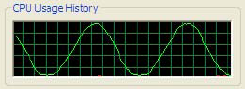
The above image is from the book.
Nowadays, when someone buys a mainstream CPU, it should be dual core by default. My laptop has a quad core Q9000 CPU.
Control the CPU curve in a multi-core CPU by make a thread spin / sleep is different from solo core CPU. For example, the spin a thread cause 100% CPU usage on solo core CPU, but cause 50% CPU usage in a dual core CPU.

Thread affinity
On a multi-core CPU, Windows shares time-slice from a random core to the thread. This AssignCurrentThreadInCpu() method is defined to help assign a thread to a specified CPU:
internal static class NativeMethods{ public static void AssignCurrentThreadInCpu(int cpuIndex) { SetThreadAffinityMask(GetCurrentThread(), new IntPtr(1 << cpuIndex)); }
[DllImport("kernel32.dll", CharSet = CharSet.Unicode)] internal static extern IntPtr SetThreadAffinityMask( IntPtr hThread, IntPtr dwThreadAffinityMask);
[DllImport("kernel32.dll", CharSet = CharSet.Unicode)] internal static extern IntPtr GetCurrentThread();}Draw curve on specified CPU
This reusable method is used to draw CPU curve:
private static void DrawCpu( int timePerPeriod, int timePerFrame, Func<int, int, double> getCpuUsage){ if (timePerFrame <= 0) { throw new ArgumentOutOfRangeException("timePerPeriod"); }
if (timePerFrame <= 0) { throw new ArgumentOutOfRangeException("timePerFrame"); }
int frameCountPerPeriod = timePerPeriod / timePerFrame; if (frameCountPerPeriod < 1) { throw new InvalidOperationException(); }
while (true) { for (int frameIndex = 0; frameIndex < frameCountPerPeriod; frameIndex++) { // If the target CPU usage is 70%, double cpuUsage = getCpuUsage(frameIndex, frameCountPerPeriod); if (cpuUsage < 0 || cpuUsage > 1) { throw new InvalidOperationException(); }
// the thread spins for 70% of the time, double busyTimePerFrame = timePerFrame * cpuUsage; double busyStartTime = Environment.TickCount; while (Environment.TickCount - busyStartTime <= busyTimePerFrame) { }
// and sleeps for the rest 30% of time. int idleTimePerFrame = (int)(timePerFrame - busyTimePerFrame); Thread.Sleep(idleTimePerFrame); } }}It takes an Func<int, int, double> parameter (x, y) => z to calculate that, in one period, at the xth frame of the total y frames, the cpu usage should be z.
Now it is ready to draw a specific curve on a specific CPU:
private static void Main(){ Thread thread0 = new Thread(() => { NativeMethods.AssignCurrentThreadInCpu(0); DrawCpu( 20 * 1000, // One period is 20 seconds. 500, // One frame takes 0.5 seconds. (index, count) => // Calculates the CPU usage. Math.Sin((2 * Math.PI) * ((double)index / count)) / 2 + 0.5); }); Thread thread1 = new Thread(() => { NativeMethods.AssignCurrentThreadInCpu(1); DrawCpu(20 * 1000, 500, (index, count) => 0.5); }); Thread thread2 = new Thread(() => { NativeMethods.AssignCurrentThreadInCpu(2); DrawCpu( 20 * 1000, 500, (index, count) => (double)index / (count - 1)); }); Thread thread3 = new Thread(() => { NativeMethods.AssignCurrentThreadInCpu(3); DrawCpu( 20 * 1000, 500, (index, count) => index < count / 2 ? 0 : 1); });
thread0.Start(); thread1.Start(); thread2.Start(); thread3.Start();
Console.Read(); // Exits. thread0.Abort(); thread1.Abort(); thread2.Abort(); thread3.Abort();}Running the above code draws the following curves in Task Manager:

This solution has an flaw that, it assumes one managed thread runs on one Windows thread. This solution is not 100% stable because a managed thread can also run on a fiber.